


Contents
If an old Vietnamese document shows text like "ViÖt Nam" or "Vieät Nam" instead of "Việt Nam", it was typed in the legacy TCVN3 encoding (fonts such as .VnTime) or VNI (fonts such as VNI-Times), not Unicode. The quickest fix is to paste the garbled text into the Vietnamese font converter: it detects the encoding, converts the text to precomposed Unicode, and you paste it back into Word with a Unicode font such as Times New Roman or Arial.
Key takeaways
- Garbled Vietnamese appears when a document uses a legacy encoding (TCVN3, VNI, VPS) and the computer lacks the matching font, or when the text is copied somewhere that only understands Unicode.
- TCVN3 typically shows "§" for "Đ" and "Ö" in "ViÖt"; VNI shows "Ñ" for "Đ" and pairs like "aä" or "eä" for accented letters.
- Convert to precomposed Unicode (NFC) so the text works everywhere: Word, the web, chat apps and email.
- Very short snippets can be detected as the wrong encoding; choose the source encoding by hand if the result looks wrong.
- After converting, switch the font to a Unicode font such as Times New Roman or Arial.
Why Vietnamese text gets garbled
Before Unicode became the norm in the early 2000s, each family of Vietnamese fonts used its own encoding: every accented letter was mapped to a different character code. The text only displayed correctly when the right font was installed.
Open an old official letter, lesson plan or ledger on a new computer without .VnTime or VNI-Times installed, or copy that text into a website or app that expects Unicode, and the old codes turn into strange Latin characters. This often catches expats and translators who receive scanned-then-typed documents from Vietnamese government offices or older companies.
Recognising the encoding from the garbage
| Original sentence | Shown in TCVN3 (.VnTime) | Shown in VNI (VNI-Times) |
|---|---|---|
| Cộng hoà xã hội chủ nghĩa Việt Nam | Céng hoµ x· héi chñ nghÜa ViÖt Nam | Coäng hoaø xaõ hoäi chuû nghóa Vieät Nam |
| Độc lập – Tự do – Hạnh phúc | §éc lËp – Tù do – H¹nh phóc | Ñoäc laäp – Töï do – Haïnh phuùc |
| Quyết định | QuyÕt ®Þnh | Quyeát ñònh |
| Hà Nội, ngày 15 tháng 3 năm 2005 | Hµ Néi, ngµy 15 th¸ng 3 n¨m 2005 | Haø Noäi, ngaøy 15 thaùng 3 naêm 2005 |
The garbled lines were produced with the converter itself; converting them back gives the original sentences exactly.
Quick tips:
- Lots of characters like §, ¸, µ, Ö, Ë, ® → almost certainly TCVN3.
- Lower-case letters followed by odd marks such as aø, eä, oä, uû, and Ñ instead of Đ → usually VNI.
- Fonts whose names start with ".Vn" (.VnTime, .VnArial) are TCVN3; fonts starting with "VNI-" (VNI-Times, VNI-Helve) are VNI.
Converting garbled text to Unicode
- Open the old file, select the garbled text and copy it (Ctrl+C).
- Open the font converter and paste it into the input box. Leave Source encoding on Detect automatically.
- Set the target to Unicode precomposed (NFC). The result appears straight away.
- Copy it, paste it back into Word and change the font of the whole passage to Times New Roman or Arial.
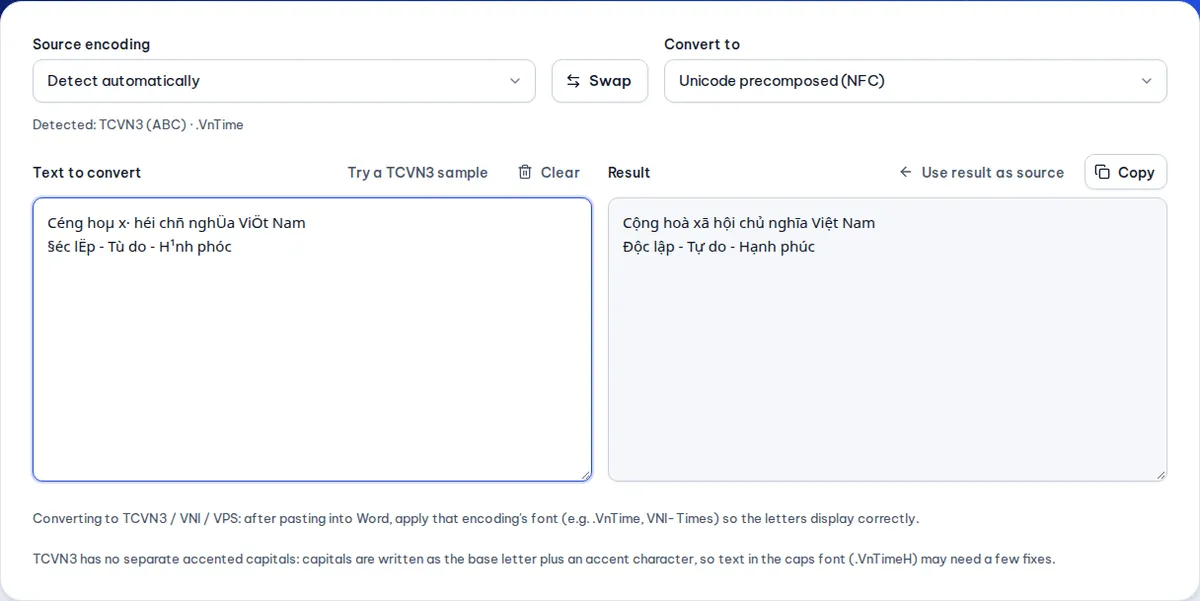
If the output still looks odd, set the source encoding yourself. A short line such as "§éc lËp – Tù do – H¹nh phóc" can be mistaken for VPS because there is too little text to judge; choosing TCVN3 gives the correct "Độc lập – Tự do – Hạnh phúc".
Precomposed versus decomposed Unicode
This is the most common invisible problem with modern documents:
- Precomposed Unicode (NFC): each accented letter is one character, so "ệ" is a single code point. This is the form to use.
- Decomposed Unicode (NFD): the letter is built from a base letter plus combining marks, so "ệ" = "e" + circumflex + dot below.
Both look identical, but decomposed text can break search, sorting and character counts and be rejected by some systems. Text pasted from certain phone apps or PDFs often comes out decomposed. The converter turns decomposed Unicode into precomposed Unicode, and you can see the difference in the word counter: the same sentence has more characters in its decomposed form.
Converting back to TCVN3 or VNI
Some older accounting software, sign-cutting machines and stamp makers only accept TCVN3 or VNI fonts. In that case:
- Paste the Unicode text into the converter and set the target to TCVN3 or VNI Windows.
- Copy the result into the target program and select the matching font (.VnTime for TCVN3, VNI-Times for VNI).
If you paste it somewhere that uses a Unicode font, it will look garbled again, which is expected.
Tips for working with old documents
- Convert the whole file at once. Select everything (Ctrl+A) rather than going paragraph by paragraph, so the result is consistent.
- Watch headings and tables. Old files sometimes mix fonts, for example headings in .VnTimeH (capitals) and body text in .VnTime. Convert the parts separately if the output is mixed up.
- Fix recurring spellings afterwards with find and replace, such as standardising "hoà" and "hòa" to your organisation's convention.
- Save in a modern format (.docx) with a Unicode font so you never have to convert it again.
Garbled text when printing or exporting to PDF
Sometimes a document looks fine on your computer but prints or exports to PDF with broken characters, or the person you send it to sees nonsense. The usual cause is a TCVN3 or VNI font that only exists on your machine. The lasting fix is to convert to Unicode before printing or sending; if you must keep the old font, turn on font embedding when you save the file in your word processor.
Frequently asked questions
How do I know which encoding a document uses?
Look at the font name in Word: names starting with ".Vn" are TCVN3, names starting with "VNI-" are VNI. If you only have the garbled text, paste it into the converter and let it detect the encoding.
Will installing .VnTime fix it?
On that one computer the text will display correctly, but it will still break when you send the file to someone else or paste it online. Converting to Unicode is the permanent solution.
Does converting lose formatting such as bold, italics or tables?
The converter handles the text. When you paste it back into Word, bold and italics may not survive; for heavily formatted documents, convert paragraph by paragraph, paste as text only and reapply the formatting.
Is my text sent to a server?
No. The conversion runs entirely in your browser, so it is fine for internal documents.
Which encodings are supported besides TCVN3 and VNI?
VPS, VIQR (accents typed as characters, such as "Vie^.t Nam"), decomposed Unicode and precomposed Unicode, in both directions.
Free tools used in this article
- Vietnamese Font Converter →Fix garbled Vietnamese: convert TCVN3 (.VnTime) and VNI to Unicode and back, with auto-detection.
- Find and Replace Text →Replace many pairs at once, whole words, accent-insensitive or regex, with highlighted matches and undo.
- Word & Character Counter →Count words, characters, sentences and paragraphs; estimate reading time and SMS parts.
#vietnamese fonts#tcvn3#vni#unicode conversion#word